

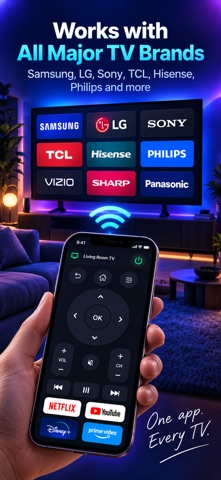


Your phone becomes the remote for the television you already own.
Point it at a Samsung, an LG, a Sony BRAVIA, a Roku, a Philips or anything running Android TV or Google TV. The app works out which remote protocol your set speaks and opens the keypad for it: arrows, OK, back, home, volume, channels, playback and power.
FINDING YOUR TV IS FREE
Searching your Wi-Fi costs nothing, so you can see whether this app finds your television before you decide anything at all. Most sets turn up by themselves. If yours stays out of sight, type its IP address — it is in the television's own network settings — and the app reaches it anyway.
WHAT THE REMOTE DOES
• The full keypad for your brand, drawn from what your set actually answers — no keys that do nothing
• Type into the TV's search box with your phone's keyboard, instead of pecking out letters with the arrows (Samsung, LG, Roku, Android TV and Google TV)
• Open an app from the list the television itself reports
• Wake a set from standby over Wi-Fi, which its own remote is usually the only thing that can do
• A number pad for channels, and the red, green, yellow and blue keys for teletext and set menus
• A trackpad for televisions with a pointer
• Every television you own, remembered and one tap apart
WHICH TELEVISIONS
Samsung — 2016 and newer (Tizen), and the encrypted 2014–15 and pre-2014 protocols.
LG — 2014 and newer (webOS), including the on-screen keyboard and the pointer.
Sony BRAVIA — the four-digit code the set shows you, or a Pre-Shared Key.
Roku — every model, and no pairing at all.
Philips — over JointSpace, which is what reaches the sets that speak nothing else.
Android TV and Google TV — any make: Philips, TCL, Hisense, Xiaomi, the NVIDIA SHIELD, and Google's own Chromecast with Google TV and Google TV Streamer.
An Apple TV and an Amazon Fire TV cannot be driven by another app on the network at all. This app says so rather than pretending otherwise — and the compatibility screen inside it tells you what has been tested on real televisions and what has not.
PAIRING, ONCE
Some televisions show a PIN, some ask you to allow the phone on their own screen, and a Roku asks for nothing. Whichever yours does, it happens the first time only: the app keeps the key and reconnects by itself afterwards.
The phone and the television have to be on the same Wi-Fi. This app is not affiliated with, endorsed by or connected to Samsung, LG, Sony, Roku, Philips, Google or Amazon; those names appear only to say which televisions the app can drive.
THE SUBSCRIPTION
Finding televisions is free, and so is the compatibility list. The remote itself is the full version, opened by a monthly or yearly auto-renewing subscription — or by a one-off lifetime purchase for anyone who would rather not subscribe. The free trial opens every part of it.
Payment is charged to your Apple Account at confirmation of purchase. The subscription renews automatically unless auto-renew is turned off at least 24 hours before the end of the current period; your account is charged for renewal within 24 hours before that. You can manage the subscription and turn auto-renewal off in your Account Settings after purchase. Any unused portion of a free trial is forfeited when a subscription is bought.
Privacy Policy: https://sblinov.com/applications-privacy-policy/
Terms of Use (EULA): https://sblinov.com/applications-terms-of-usage/
Support: https://sblinov.com/contact-us/